![checkin-logo-1.svg]](https://www.checkinevent.com/hubfs/checkin-logo-1.svg)
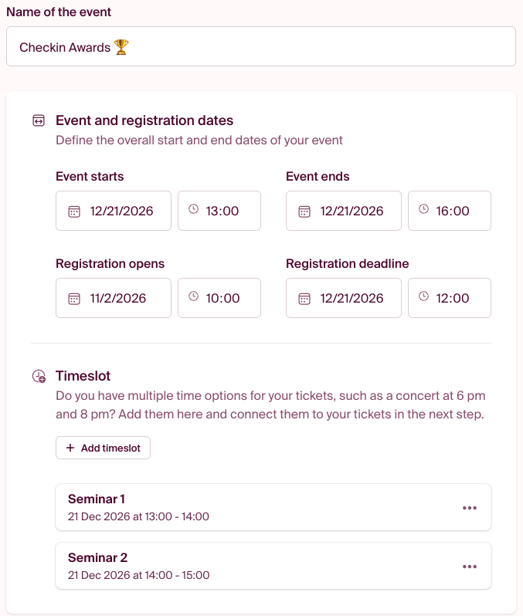
Timeslots
Do you need different tickets to have their own start and end times? If so, you can add time slots directly below the event date. Read more about time slots here.
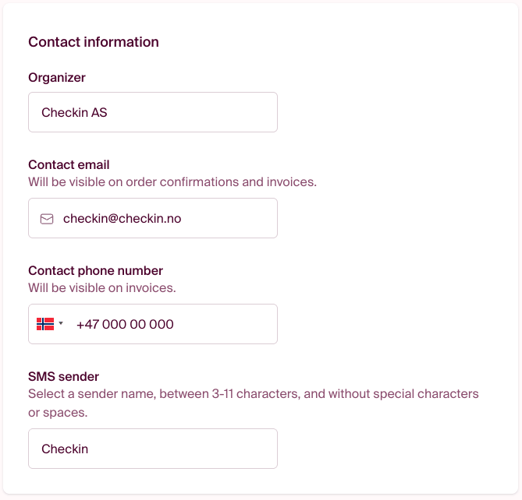
Contact Information
Organizer: The name of the company, association, organization, or individual responsible for the event.
Contact email: The email address participants can use to contact you. This address is displayed in the order confirmation and on invoices, so we recommend using an email address that is monitored regularly.
Contact phone number: The phone number displayed on invoices.
SMS sender name: The name participants will see as the sender when they receive SMS messages from the event. The sender name must be between 3 and 11 characters long and cannot contain special characters, spaces, or the letters Æ, Ø, or Å.
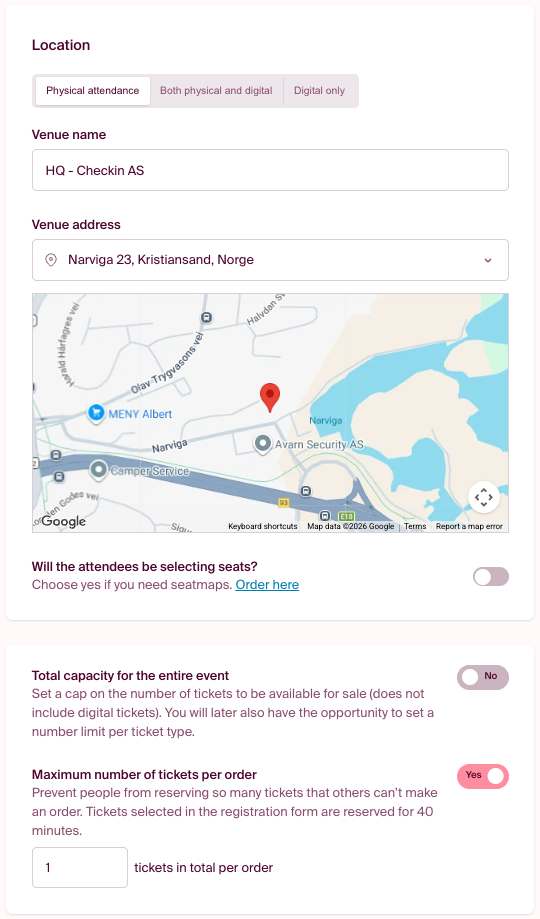
Location
Participation type: Choose how participants will attend the event.
- In-person attendance – All participants attend on-site.
- In-person and online – A hybrid event where participants can choose whether to attend in person or online.
- Online only – The event takes place entirely online.
Venue name: The name of the venue, such as a hotel, concert hall, or meeting room.
Venue address: Search for the address, and the location will be displayed on the map.
Will participants choose their own seats? Enable this option if participants should be able to select their own seats. A seating chart is required and can be ordered through the link provided in the setup or by clicking here.
Total event capacity:
Set a limit on the total number of tickets available for sale. Digital tickets are not included in this count. You can also set individual capacity limits for each ticket type later in the setup process.
Maximum number of tickets per order:
Limit how many tickets a single person can order at one time to prevent individuals from reserving too many tickets and blocking others from purchasing. Tickets added through the registration form are reserved for 40 minutes. If the order is not completed, the reserved quantity will be released after this period.
Note: If you are using ticket sales, tickets are reserved for only 15 minutes.
Click Next to continue.
The next step in the set up: TICKETS