![checkin-logo-1.svg]](https://www.checkinevent.com/hubfs/checkin-logo-1.svg)
How to send an SMS or email, or perform a test:
Go to the event’s “Attendees” tab and click “Send SMS” or “Send email”, or you can click on for example a ticket type on the “Overview” tab to retrieve a list of only those participants, and then click “Send SMS” or “Send email”.
Note: To send SMS, you must have sufficient funds in your account, meaning you must have received income from one of your events to cover the cost. The price for SMS is NOK 0.80 excluding VAT per message.

To make the message in an SMS or email more personalized and user-friendly, you can add merge fields to the message. See the example below (the email window will look the same):
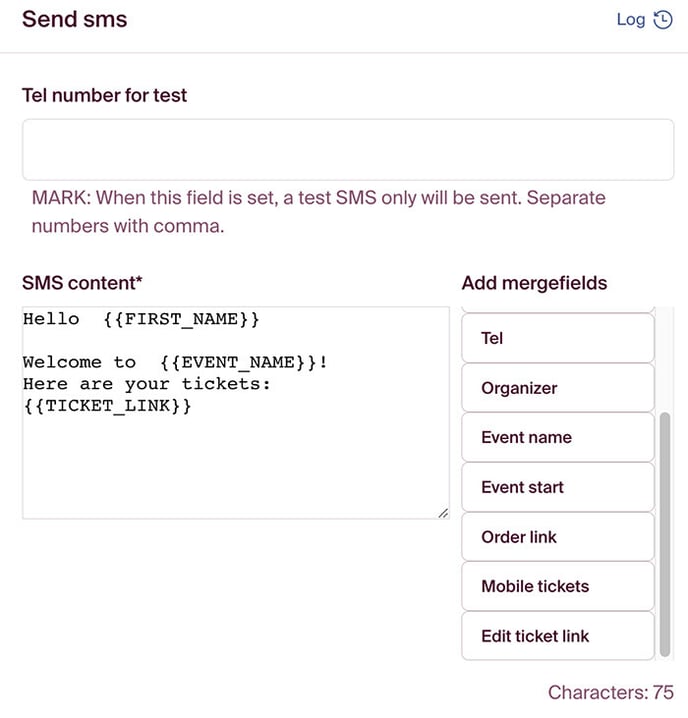
You can choose to send to everyone at once or do this in intervals. Please be aware that it may take some time before all messages are sent out if you have many participants.
Note: If you have some participants on a waiting list, they will also receive SMS/Email if you send from “All attendees” in the “Attendees” tab. If you want to send only to those who have secured a spot, we recommend adding the filter “Status” “is none of” with the values “Waiting list” and “Canceled”.
If you want to perform a test on email or SMS, you can do so by entering a number in the “Test number for SMS/test email for email” field. But be aware that merge fields retrieve information from a real order. This means that merge fields will be blank if you haven’t created a complete test order for your event with the email address or phone number you are testing.