.svg)

In this article:
- What does Checkin do?
- Why is Checkin unique?
- 5 ways in which Checkin is different
- Why event organizors choose Checkin
- The Checkin advantage: Built for your specific challenges
- Why the Checkin approach works: real results
- Why you should try Checkin - It's completely risk-free
- Conclusion - It's about your bottom line
- Checkin FAQ's
Are you still creating invoices for your event manually?
If you're managing 400+ participant conferences and events, you already know the basic registration platform isn't enough.
You need a system built specifically for the daily complexity—from multiple ticket types and sophisticated payment requirements to managing all your event's financial work, including invoicing, payments, refunds, and accounting reports.
This administrative burden is why event organizers are switching to Checkin.Why?
For starters, Checkin can reduce your event accounting workload by up to 95%.
In this article, you'll learn why event organizers in the Nordics are choosing Checkin to move beyond simple registration solutions and start automating the boring stuff.
What does Checkin do?
Think of Checkin as your event assistant that never sleeps. It handles everything you need to run a successful event:
- selling tickets,
- invoicing attendees,
- collecting payments,
- checking in attendees at your event, and
- tracking your results.
All those hours you'd normally spend on invoices, spreadsheets, and admin tasks?
Checkin does them automatically, so you can focus on making your event amazing.
Your participants get a smooth, professional experience. You get your time back.Full disclosure: If you genuinely love the thrill of hunting down late payments, view Excel as your safe space, or get a rush from manually handling endless order changes — Checkin will disappoint you.
We automate the boring stuff so ruthlessly that you'll be left with nothing but time to focus on what actually matters: creating unforgettable events.
Why Checkin is unique
Most event registration platforms just handle registration. Checkin does registration and all your financial work:
- automated invoicing,
- collecting payments, and
- creating accounting reports.
Other platforms leave a gap between selling tickets and managing your money. That gap forces you to do tons of manual work in your accounting solution.
Checkin closes that gap for you.
Jobs that used to take hours? Now they take a few clicks. Your accountant gets clean, ready-to-use reports. You get to focus on your event instead of paperwork.
Your payoff: If you handle finances yourself, you save hours every week. If you pay an accountant, you'll save money—because they'll spend way less time on your books.
6 ways in which Checkin is different
1. Integrated accounting and payment module (Not Just Registration)
Why this matters:
Did you know that an average event organizer handles 2,864 documents and 4,000 accounting lines per quarter, including invoices, receipts, credit notes, payments, and refunds? Among these, 982 are invoices and 114 are credit notes. These figures come from our own analysis of customer accounting data, not a third-party study — worth knowing if you want to cite the number elsewhere.
Manually creating these in an accounting system takes about 101 hours per quarter, costing around €10,750 at a standard accounting rate. A total of €43,000 annually.
And that doesn't even include other document types.
(For a more detailed overview, see "How much you can save on accounting with Checkin" on our blog.)
What Checkin does differently:
- Smart invoicing system: Automatically generate invoices with the correct VAT
- Accounting reports: Bi-weekly accounting reports ready for your accounting solution
- Advanced payment tracking: Manages payments, refunds participants with a click of a button, and sends automated payment reminders
- Real-time financial dashboard: See your real-time event revenue as well as exactly who owes what, when - without spreadsheets
The attendee selects their preferred payment method (invoice, card, or mobile payment app), and the rest is automated, including reminders and debt collection.
With Checkin, participants are invoiced automatically when reserving their tickets, or your team invoices them after an order change has been made. You can make order changes and create a new invoice in 10 seconds. Credit notes take about a minute.
Everything happens directly in Checkin—from automatic invoicing to bi-weekly reports your accountant can use immediately.
The result: You can reduce the accounting workload for your event(s) to just 5 hours (instead of 101 hours) per quarter—costing only €540, or €2,150 per year.
That's a 95% cost reduction.
Using Checkin, you can also reduce accounting lines from 4,000 to 35 on average—a 99% reduction.
Instead of posting detailed transactions per customer, Checkin summarizes data into predefined account categories (e.g., ticket sales, food sales), and detailed data remains accessible in Checkin when needed.
(Source: How much you can save on accounting with Checkin)
2. True complexity handling (Not basic registration)
Why this matters:
Your events aren't simple. You have early bird pricing, group discounts, workshop capacity limits, meal preferences, and accommodation coordination to keep track of.
Basic tools won't help you save time; they will break under this level of complexity.
What Checkin does differently:
- You can offer your participants package deals: Combine multiple offers, such as the entrance ticket, meals, and overnight stay, with package deals.
- Offer customized seating and floor maps: Allow participants and stand holders to choose where they want to sit or have their stand from a map made specifically for your event.
- Manage all order changes in one place: Whether you have to change a ticket type, hotel room, or which workshop the participant wants to attend, you can manage all these changes in one place.
- A smart and flexible booking solution: Allow your participant to book their hotel room and additional services inside your registration form, saving both them and you time.
The result: With Checkin, you will work more time-efficiently while having full control — even when your event setup is complicated.
3. Success-based pricing (No monthly fees that drain your budget)
Why this matters:
Why would you pay the same for your event registration solution whether your event succeeds or fails? Why would you pay monthly fees when your events are seasonal?
What Checkin does differently:
- You only pay for success: €1 per attendee + 2% of ticket revenue. Read more about our pricing model.
- Bi-weekly payouts as tickets are sold: Checkin automatically collects your revenue for you, and you receive a payout from us every two weeks. You won't have to wait until your event is over before getting your money.
- Zero fixed costs: No setup fees, no monthly subscriptions, no yearly binding contracts.
- Aligned incentives: We can only succeed when your event succeeds.
The result: Our goals are aligned because our success is your success. Which is why we can honestly say that we want to offer you all the help we can to help you succeed with your event.
4. Complete white label experience (Not generic branded sign-up forms)
Why this matters:
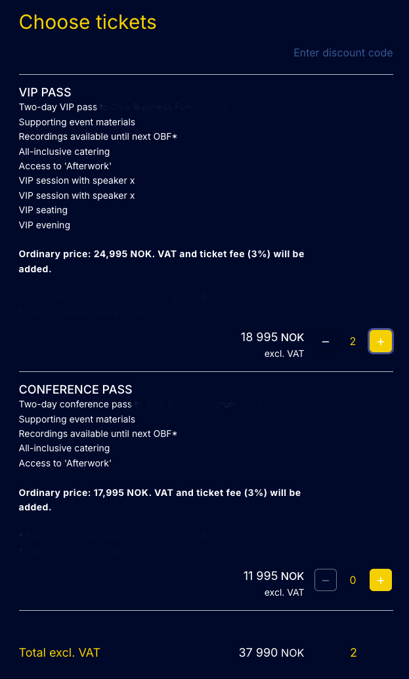
Your brand reputation is on the line. When participants register for your conference or exclusive training program, they should see YOUR brand at every touchpoint - not a third-party registration platform logo.
What Checkin does differently:
- Fully branded registration experience: Your logo, colors, fonts, and messaging from start to finish.
- Custom domain integration: Participants register on your website, not ours. (unless you want to use a standard, out-of-the-box registration page)
- Invisible technology: Participants never know you're using Checkin - they only see your professional brand.
- Consistent experience: From social media post to landing page to the check-in confirmation, everything matches your brand identity.
The result:
Your brand can make a difference and help lift the quality of your user experience and the overall quality of your event. With an abundance of events, your brand is what will set you apart from your competition.
5. Nordic market expertise (Not generic international solutions)
Why this matters:
When organizing events in the Nordics, your participants want to use Vipps, Swish, and MobilePay to pay for their tickets. You need reports with the correct VAT, and you want support in your time zone - not generic solutions built for other markets.
What Checkin does differently:
- Native Scandinavian payment apps are included: Vipps (Norway), Swish (Sweden), MobilePay (Denmark), plus VISA, MasterCard, and automated invoicing are included in your agreement.
- Nordic compliance built in: Multi-country VAT handling, GDPR compliance, and regional regulations are safeguarded.
- Runs natively in NOK, SEK, and DKK: This article is written in English and priced in EUR for readability, but nothing about Checkin is "translated" for the Nordics as an afterthought. Invoicing, reporting, and your bi-weekly payouts happen in your own local currency, with no manual conversion required.
- Scandinavian support team: Real people, Nordic business hours, understanding of regional market dynamics is what you can expect from Checkin.
The result:
With our payment solutions, there will be no payment headaches, no compliance worries, no 3 AM support tickets.
6. AI-native: Talk to your data with Checkin's MCP server (Not screenshots and CSV exports)
Why this matters:
Most event platforms treat AI as a bolt-on: a chatbot on the support page, or a button that drafts an email for you. Getting an actual answer out of your own event data still usually means logging in, clicking through menus, filtering, and exporting a spreadsheet.
What Checkin does differently:
- A live connection between your data and your AI assistant: Checkin has launched its own MCP (Model Context Protocol) server — the open standard, developed by Anthropic, that lets AI tools like Claude and Cursor query external systems directly. Very few event platforms currently support it; most still limit you to CSV exports or a developer-facing REST API.
- Nine built-in tools, no technical setup: from finding attendees with allergies or accessibility needs, to full event dashboards, sales breakdowns, real-time check-in status, outstanding payments, and side-by-side comparisons across up to 10 events at once.
- Connects to the data you already have: the same CRM, orders, and event records covered elsewhere in this article are what the MCP server queries — nothing new to set up or maintain separately.
- One-minute setup: add
https://mcp.checkinevent.comas a custom connector in Claude, approve access, and start asking questions in plain language. Other MCP-compatible tools follow the same pattern. - Built with privacy in mind: every call requires a valid token, personal data is masked by default unless explicitly requested, access is limited to your own organization's data, and every query is logged for audit purposes — in line with GDPR's data minimization principle.
The result:
Instead of logging into a dashboard, you can just ask: "How's check-in going at the Leadership Conference right now?" or "Show me all unpaid orders from the Annual Conference" or "Compare ticket revenue from our last three events." Checkin's MCP server turns reporting into a conversation — see our knowledge base for full setup steps.
Plus all the features you'd expect (and some you wouldn't)
Beyond these six core differentiators, Checkin includes features that organizers use every single day:
- Mobile check-in app for fast, professional on-site registration
- Built-in CRM that keeps every contact, order, and event history in one place — no separate system to maintain
- SMS and e-mail communication so you can directly reach attendees with the information they need
- Powerful discount engine with unlimited flexibility
- Automated waiting lists that manage themselves
- Built-in analytics tracking (Google Analytics and Meta pixel)
- Ready-to-use integrations with HubSpot, Mailchimp, Mail Mojo, Teams, and Zoom — all free
Why event organizers choose Checkin
The breaking point: When simple tools stop working
"We saw the immediate need for a solution that allows us to work more efficiently," says Guro Sandersen, Project leader at ODA-network.
"Time is our most limiting factor, so we needed better, smarter solutions. With Checkin we save over 50 hours on handling registrations and administration alone. Which makes a huge difference for us and our volunteers.

The relief: When everything just works
"Using Checkin is so easy and so seamless! It's amazing to see that Checkin is committed to making the job we do as easy as possible," says Hege Svendsen, Managing Director at The Norwegian Data Association (DND)
"We managed to get rid of so many tasks that wasted our time. We can now get more work done without having to hire extra personnel. Checkin just works, which makes me super happy!"
The desired result: Full control for the entire team
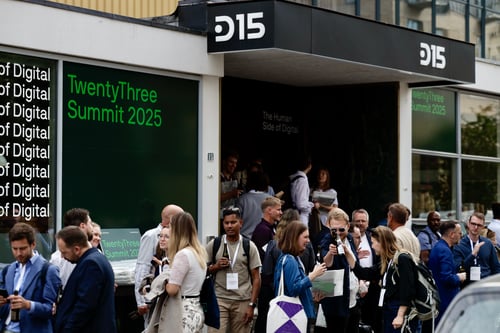
"Checkin allowed the marketing team to stay in full control of the signups. We were able to invite our entire team to collaborate and be part of the process.
However, the marketing team never lost control. And Checkin basically cut our time in half when it came to signup management." says Amelia Holmsen, Head of Community Marketing, TwentyThree
The Checkin advantage: Built for your specific challenges
Different events face different challenges. Here's how Checkin adapts to yours:
For conferences and fairs
Checkin handles the complex logistics so you can focus on creating an unforgettable experience.
-
Flexible pricing structures including package deals that bundle tickets, meals, and accommodation
-
Automated financial management with invoicing, payment reminders, and accounting reports
-
Seamless check-in experience that keeps lines moving and attendees happy
-
Built-in integrations with HubSpot, Mailchimp, Teams, and Zoom - Free to use.
-
Hotel booking directly in your registration form
-
Compliance documentation that satisfies auditors and stakeholders
For professional courses and e-learning programs
-
Mobile check-in app to track attendance effortlessly
-
Automated course certificates sent to participants who complete your program
-
Complete financial automation including invoicing, payment reminders, and reports
-
Integrated hotel booking for multi-day training programs
-
Participant communication tools to keep learners engaged throughout the course
For multi-day festivals & concerts
-
Custom seating and floor maps for attendees, vendors, and sponsors to choose their spots
-
Vendor and sponsor packages with specialized pricing and access controls
-
Merchandise and add-on sales to maximize revenue opportunities
-
Comprehensive booking module for hotels, glamping, campsites, and other accommodations
-
Real-time capacity management across multiple stages, areas, and time slots
Why Checkin's approach works: Real results
We should have chosen Checkin way earlier
"I needed something that could make my everyday work easier. With Checkin, that's exactly what I found," says Ingvild Ryggen Carsten, Managing Director at GeoPublishing events.
"We use Checkin for registrations, hotel bookings, and communication with participants. Checkin's accounting module has also made things easier. We save both time and money with Checkin's accounting module. It makes it easy for our accountant to keep track of the entries, which simplifies the accounting work."
Built for Scale, Designed for Reliability
"Since we switched to Checkin, participant registration has become much easier, and conversions have skyrocketed! Checkin creates seamless, next-generation customer journeys for the events industry." Says Christoffer Omberg, Co-founder and Partner Oslo Business Forum
Why you should try Checkin - It's completely risk-free
Creating a Checkin account costs you nothing.
You can test and use Checkin completely free, up to the point where you have sold your first event ticket.
As we like to say: "We take on a large portion of your workload, but only a tiny fraction of your ticket revenue."
Our pricing is simple:
- For paid events: €1 per attendee + 2% of ticket revenue (a 2.5% transaction fee may apply depending on the payment solution your attendee uses)
- For free events: Only €1 per registered attendee
Check out our complete pricing model here.
Here's how you get started:
Step 1: Set up your event (Cost: €0)
What you do: Create your free Checkin account and build your event. Test every feature for as long as you need—days, weeks, or months. There's no pressure and no time limit.
How we help: Our team reviews your setup and optimizes it for your specific needs. Think of us as your event tech consultants.
What you pay: Nothing. Zero. It's completely free until you sell your first ticket.
Step 2: Launch and open registration (Cost: Still €0)
What you do: Publish your event page, open registration, and start promoting to your audience.
How we help: We're available for any questions or changes you need during the registration period. Real support from real people.
What you pay: Still nothing. Zero cost until actual revenue starts flowing.
Step 3: Run your event successfully (Cost: Success-based)
What you do: Focus entirely on attendee experience and delivering an unforgettable event.
How we help: Checkin helps you save time when handling order changes, registrations, processing payments, and sending attendee communication. It all runs seamlessly in the background.
What you pay: €1 per actual attendee + 2% of ticket revenue + 2.5% transaction fee per paid ticket sold.
Conclusion: It's about your bottom line
Stop letting simple tools complicate your events.
Your conferences, festivals, and professional courses deserve a platform built specifically for the level of detail and administration you manage every day.
Checkin isn't just a registration tool; it's the all-in-one solution that handles the heavy lifting—from integrated financial administration to complexity handling, seamless check-in, and now, direct AI access to your data.
This means you can reduce your accounting workload by up to 95% and save dozens of hours on manual tasks.
Which is the main reason why event organizers in the Nordics are switching to Checkin.
Checkin is the smart choice built for your specific challenges.
The best part? It's entirely risk-free to try.
There are zero costs until you sell your first ticket. You can set up your event, test every feature, and see exactly how Checkin handles your specific challenges, all for free.
Create your account today, or schedule your personalized demo.
Checkin FAQ's
1. What is Checkin?
Answer: Checkin is a complete event management platform that covers every stage of the participant journey — from registration and payments to on-site check-in and post-event reporting.
Unlike simple registration systems, Checkin is designed for event organizers who run larger or more complex events with multiple ticket categories, advanced payment setups, and hundreds of attendees.
By automating routine tasks, simplifying financial workflows, and providing live insight into event performance, Checkin helps reduce administrative work while ensuring a smooth and professional experience for both organizers and participants.
2. Who uses Checkin?
Answer: Checkin is the all-in-one platform for the modern, professional event organizer who runs complex events like conferences, festivals, corporate gatherings, and large non-profit events, as well as those who provide physical and digital courses weekly.
Our users are those who:
- Manage 400+ participants and need a system built for that scale and complexity.
- Want to automate their entire financial process (invoicing, payments, and accounting reports), not just registration.
- Aim to reduce administrative work by up to 95% to focus on creating unforgettable experiences.
3. What makes Checkin different from other event registration tools?
Answer: Checkin is an all-in-one event management platform that goes far beyond simple registration. It's built for event organizers managing complex events with hundreds of participants.
The key differences:
- Integrated Accounting: Checkin automates the entire financial process—from invoicing and payment collection to clean accounting reports. This removes the need to juggle separate financial and registration systems and can reduce accounting hours by up to 95%.
- True Complexity Handling: The system handles complexity that breaks basic tools. It allows for features like package deals, custom seating maps, and managing all order changes in one place.
- White-Label Branding: You get a fully branded, professional experience where participants register on your website using a custom domain.
- Nordic Expertise: It natively supports Scandinavian payment apps like Vipps, Swish, and MobilePay, runs in NOK, SEK, and DKK, and has built-in Nordic compliance.
- AI-native: Checkin's MCP server lets you query your event data directly from Claude and other AI tools — no exports required.
Checkin is the complete solution for organizers who need to eliminate administrative work and streamline financial workflows.
4. Does Checkin work for both free and paid events?
Answer: Yes, absolutely.
Checkin is fully flexible: it works for events that are entirely free, entirely paid, or a combination of both.
You can use the platform to manage free registrations and participants, or set up multiple paid ticket types, manage discounts, and handle secure online payments.
The Checkin system is completely free to use until you sell your first ticket. For free events, the only cost is €1 per ticket.
5. What does Checkin cost?
Answer: Checkin uses a transparent, success-based pricing model with zero fixed costs. You can create and publish your event for free; costs only occur when participants register.
- Zero Upfront Fees: There are no setup fees, monthly subscriptions, or hidden costs.
- Paid Events: You only pay €1 per actual attendee + 2% of ticket revenue (a 2.5% transaction fee may apply depending on the payment solution your attendees use).
- Free Events: The cost is just €1 per ticket.
As an event organizer, you maintain flexibility: you can choose to include the cost of Checkin in your ticket price.
6. How do I get started with Checkin?
Answer: Getting started is simple and completely risk-free.
- Create a Free Account: Sign up on checkinevent.com and set up your event in minutes. You can test all features for free and for as long as you want.
- Launch for Free: Publish your event and open registration without paying anything. You have zero cost until you sell your first ticket.
If you need hands-on guidance, you can also book a complimentary, 30-minute personalized demo to review your specific challenges and optimize your setup.
7. Does Checkin support AI tools like Claude?
Answer: Yes. Checkin has launched its own MCP (Model Context Protocol) server, letting AI tools such as Claude and Cursor connect directly to your event data in real time — no exports or manual reporting needed.
Setup takes under a minute: add https://mcp.checkinevent.com as a custom connector in your AI tool and approve access. From there, you can ask questions like "How's check-in going right now?" or "Show me all unpaid orders from the Annual Conference" and get an answer instantly.
Access is limited to your own organization's data, personal information is masked by default, and every request is logged for audit purposes, in line with GDPR's data minimization principle. See our knowledge base for full setup steps.
Last updated: August 2026